Software development isn’t just about writing code, it’s about building reliable, secure, and high-performing products that support real business outcomes. Yet many projects fail, exceed budget, or require costly rework simply because testing wasn’t given the attention it deserved.
Testing is more than a final step before launch; it’s an essential part of every phase of development, ensuring that each feature works as expected, integrates smoothly, and meets user needs. When done correctly, testing reduces total project cost, accelerates timelines, and protects your investment by preventing issues long before they become expensive problems.
In this article, we break down the core testing methodologies, the differences between manual and automated testing, and the supporting practices that strengthen quality assurance.
What is Software Development Testing?
Software development testing is the process of checking whether an application works the way it’s supposed to—functionally, securely, and reliably.
In simple terms, it’s how teams confirm that every feature, integration, and user interaction performs as intended before the software reaches real users.
Modern development embeds testing into every phase because catching issues early prevents them from growing into expensive, time-consuming problems later on. Instead of waiting until the end to uncover major flaws, continuous testing ensures each new component is stable as the product evolves. This approach not only improves quality but also reduces the total project cost by minimizing rework.
When problems are resolved early, timelines move faster, risks decrease, and the final product is more predictable, polished, and ready for long-term success.
The Role of Testing in Software Development
Testing plays a critical role in software development because it is a core part of risk management. Every feature, integration, and user workflow carries potential points of failure, and testing helps identify these risks long before they can impact customers, operations, or revenue.
Beyond technical accuracy, testing ensures the software actually aligns with your business requirements, confirming that what’s being built supports real goals, solves the right problems, and delivers the intended value. It also supports long-term scalability by verifying that the application can handle growth, increased traffic, and evolving use cases without breaking.
Testing contributes to compliance as well, helping businesses meet industry standards, protect sensitive data, and maintain regulatory obligations.
Finally, a well-tested product is easier and more cost-effective to maintain. By validating stability and performance from the start, testing creates a stronger foundation for future updates, enhancements, and ongoing improvements.
Core Software Testing Methodologies
Software testing methodologies are structured approaches that guide how testing is planned, executed, and measured throughout the development lifecycle. Unlike individual tests (which focus on checking specific features or components), methodologies define the overall strategy that determines what gets tested, when, and to what depth.
A strong methodology ensures that quality isn’t left to chance; it’s built intentionally into every phase of development.
Functional Testing
Functional testing validates whether the software behaves as intended and supports the business workflows it was designed to enable. By confirming that every button, form, integration, and user action works correctly, functional testing minimizes operational risk and ensures the product delivers meaningful value to end users.
- Unit Testing: This method checks the smallest pieces of code (individual functions or components) to verify that each part works correctly on its own. For example, if your app processes customer orders, a unit test might confirm that tax calculations are always correct, no matter the location or price.
- Integration Testing: Integrations are common failure points because separate systems don’t always communicate cleanly. Integration testing ensures that data flows properly between systems (such as your CRM, payment gateway, or inventory system), and prevents failures caused by mismatched formats, timing issues, or external system changes.
- System & End-to-End Testing: This methodology checks the entire application from start to finish, validating how all components behave together. For business owners, this ensures that the customer journey works seamlessly (from login, to navigation, to completing core actions) before the product goes live.
- Regression Testing: This is triggered any time new features, fixes, or updates are introduced. Its purpose is to confirm that existing functionality hasn’t been accidentally broken. During rapid development cycles, regression testing is essential because even small changes can cause ripple effects across the system.
- User Acceptance Testing: UAT ensures the final product meets real business requirements, not just technical specifications. It validates that the software behaves the way your users expect. When trying to choose the right users for UAT, pick a mix of internal stakeholders, experienced employees, and actual end users who represent your target audience.
Non-Functional Testing
Non-functional testing evaluates how well the software performs, not just what it does. This protects the user experience, ensures the system can scale, and verifies that the software is secure, compliant, and accessible. These factors heavily influence customer satisfaction, operational continuity, and long-term success.
- Performance, Load & Stress Testing: These tests evaluate how the system behaves under normal, high, and extreme traffic conditions. It ultimately ensures that the software will be reliable during peak usage, prevents slowdowns or crashes during events like product launches, seasonal spikes, or large data imports. For example, an e-commerce app might undergo load testing to ensure it can handle thousands of simultaneous checkout attempts during a holiday sale.
- Security Testing: Security testing identifies vulnerabilities that could lead to breaches, data loss, fraud, or compliance violations. For example, penetration testing simulates real attacks to uncover weak points before hackers do. Industries handling sensitive information (such as HIPAA-regulated healthcare apps, SOC 2–compliant SaaS platforms, or financial systems) require strict validation to ensure encryption, access controls, and data handling rules are correctly implemented.
- Usability & Accessibility Testing: Usability testing ensures your product is intuitive and easy for users to navigate. Accessibility testing verifies compliance with standards such as WCAG, ensuring people with disabilities can use your software. It is important to note that due to legal risk, compliance requirements, and broader market inclusivity, accessibility can no longer be optional.
- Compatibility & Device Testing: This testing confirms that your application works across different devices, operating systems, browsers, and screen sizes. This especially affects mobile app success as users expect flawless performance on iOS and Android; therefore, compatibility testing directly influences retention, ratings, and overall customer satisfaction.
Manual Versus Automated Testing
In modern software development, both manual and automated testing play important roles. While they share the same goal, they serve different purposes and are most effective in different contexts. Understanding how they complement each other helps businesses choose the right testing strategy for cost efficiency, accuracy, and long-term product stability.
Manual Testing
Manual testing is essential when human judgment, intuition, and real-world thinking are required. It’s the best approach for evaluating user experience, visual elements, complex workflows, and new features that haven’t yet stabilized.
Because a human is interacting directly with the system, manual testing uncovers issues automated tests may miss; such as confusing navigation, unclear messaging, or unexpected user behavior patterns.
Pros of Manual Testing
- Flexible and adaptable to changing requirements
- Ideal for exploratory testing and UX evaluation
- Provides qualitative insights automation cannot replicate
Cons of Manual Testing
- Slower and more labor-intensive
- More prone to human error
- Less scalable for large, repetitive test cycles
Human judgment is irreplaceable when testing scenarios that rely on emotion, perception, or subjective quality. Therefore, manual testing remains the gold standard for validating real-world usability before launch.
Automated Testing
Automated testing uses scripts and tools to run tests quickly and repeatedly. It is highly efficient for verifying stable features, running regression tests, and handling large amounts of test data. Automated testing accelerates development cycles by catching issues early and reducing time spent on repetitive manual checks.
Pros of Automated Testing
- Extremely fast and cost-efficient at scale
- Provides consistent, repeatable results
- Excellent for regression, performance, and load testing
- Reduces long-term quality assurance (QA) costs for mature systems
Cons of Automated Testing
- Higher upfront investment to build and maintain test scripts
- Not suitable for rapidly changing or early-stage features
- Cannot evaluate UX, visual quality, or subjective experiences
It is important to note that automation is not a good investment for prototypes, early builds, or features that are still evolving. If scripts must be rewritten with every change, automation becomes wasteful rather than efficient. It also cannot detect “human” issues, like whether content is confusing or whether a feature feels intuitive.
Supporting Practices That Strengthen Testing
Strong testing isn’t isolated. It works best alongside practices that improve code quality, reduce defects early on, and keep development efficient. The following supporting practices significantly strengthen the impact of both manual and automated testing.
Code Review vs Testing
Code reviews focus on the structure and logic of the code itself, catching issues like inefficient algorithms, inconsistent patterns, and missing edge-case handling long before testing begins. These reviews help maintain code quality, which directly influences long-term costs by making future updates faster and safer.
However, a code review cannot replicate real execution. Testing uncovers issues that only appear when the software runs. This includes integration conflicts, user-flow problems, broken UI elements, or performance degradation under load.
While code reviews protect maintainability and reduce technical debt, testing ensures that the product behaves correctly for users. Together, they form a complete quality assurance approach.
Continuous Testing in Agile and DevOps Environments
Continuous testing is the practice of running tests automatically throughout development, not just at the end of a sprint. Modern Agile and DevOps environments rely on this because teams release smaller updates more frequently, and each update must be validated quickly and consistently.
Continuous testing shortens release cycles by catching defects the moment they are introduced, preventing issues from piling up in the backlog or becoming harder to diagnose later. This approach keeps development moving smoothly, reduces rework, and increases confidence in rapid deployments.
Testing Initial Concepts and Prototypes
Testing early concepts and prototypes helps teams validate assumptions before committing time and budget to full development. By putting early designs or interactive mockups in front of users, businesses can quickly identify confusing workflows, unclear value propositions, or features that don’t meet real needs.
For example, a prototype of a booking flow may reveal that customers struggle to complete the process, allowing the team to fix the issue before coding begins.
Early testing prevents costly redesigns and ensures the final product is built on validated insights rather than guesswork.
Application Development Testing Strategy
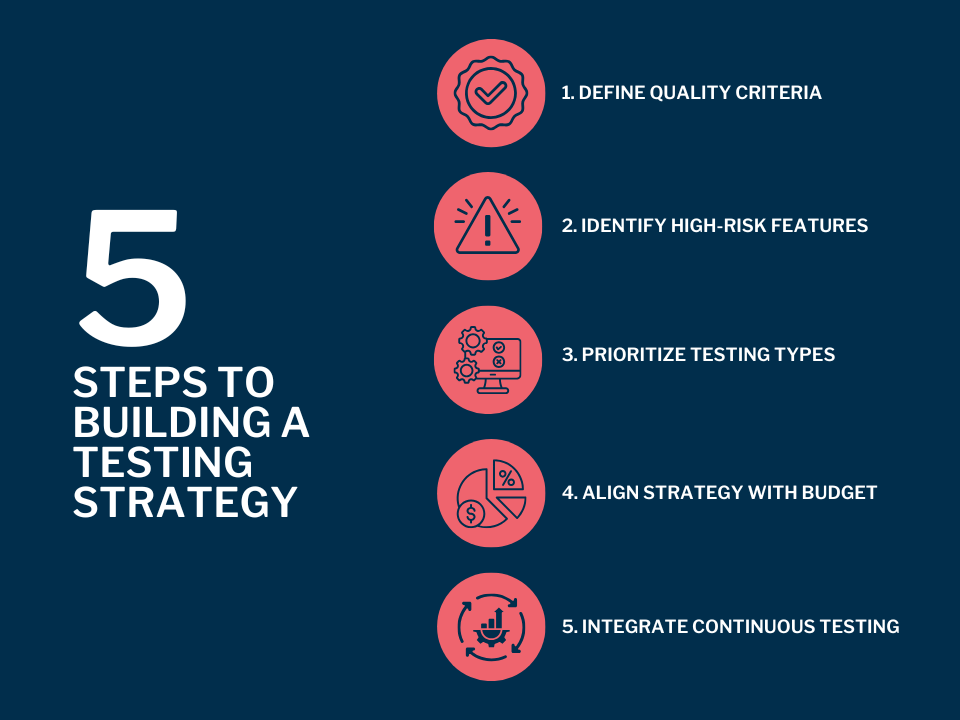
Building a strong testing strategy begins by defining clear quality criteria, such as performance expectations, compliance requirements, or usability standards. From there, teams can prioritize which testing types matter most, based on the product’s purpose.
Identifying high-risk features is essential as well; areas that handle payments, user data, or third-party integrations typically require deeper testing. Finally, the strategy should align with budget realities by focusing the most intensive testing where failures would be most costly, both financially and operationally.
When evaluating and choosing a development partner’s testing process, business owners should ask key questions such as:
- When do you start testing?
- What testing types are included?
- How do you ensure defects don’t resurface?
Warning signs of poor QA include testing only at the end, relying exclusively on manual testing, lacking documentation, or treating testing as optional.
At AppIt, testing is integrated into every phase (from discovery to deployment) ensuring stability, user satisfaction, and long-term maintainability throughout the entire development lifecycle.
Common Mistakes Businesses Make When Overlooking Testing
Many software failures can be traced back to decisions made early in the development process, especially when testing is minimized or skipped entirely. These mistakes often lead to higher costs, delays, security risks, and frustrated users.
Below are the most common pitfalls businesses face when testing is not treated as a strategic priority.
- Not Budgeting for QA: When QA is not included in the initial budget, teams are forced to cut corners later. This often results in defects slipping into production, which costs significantly more to fix after deployment. Proper budgeting ensures testing is planned, executed, and maintained throughout the project.
- Treating QA as Optional: Some teams view testing as something that happens “if time allows.” This mindset leads to unstable releases, user dissatisfaction, and unnecessary rework. Testing is an essential part of development, not an add-on.
- Not Involving Users: Skipping user feedback means teams rely on assumptions rather than actual behavior. Without real user input, businesses risk launching features that are confusing, unwanted, or misaligned with customer needs.
- Underestimating Integration Risks: Integrations with payment gateways, CRMs, APIs, or cloud services frequently break under real-world conditions. Without thorough integration testing, businesses face outages, data sync issues, and failed transactions that damage trust and revenue.
If you want a development partner who builds testing into every stage of the process and ensures long-term product quality, contact AppIt to discuss your next software development project.