


Testing is a critical step in delivering high-quality applications, but mobile and web apps face very different challenges that demand distinct approaches. From native apps that interact with device hardware to web applications that run inside browsers, the tools used for testing must align with each platform’s architecture, performance expectations, and security requirements.
This article provides a practical guide for business leaders and decision-makers who want to understand how to select the right testing tools for their projects.
We explore how architecture, environment complexity, fragmentation, interaction models, and integration requirements shape testing tool selection. We also compare the ecosystems of mobile- and web-focused tools, explain how network and performance realities differ, and offer guidance on aligning tools with project risks, budget constraints, and business goals.
Architectural Differences Drive Software Development Testing Tool Requirements
The architecture of an application fundamentally shapes the testing tools required to validate its behavior. Native mobile apps are built to interact directly with operating-system layers and hardware components such as sensors, secure storage, and biometric authentication. Because these interactions must be tested on actual devices or high-fidelity simulators, native testing relies on tools like Appium, Espresso, or XCUITest that can access device-specific capabilities.
Hybrid applications, by contrast, operate inside an embedded browser while still tapping into certain device features. Their blended structure means testers need platforms that can validate both web-driven logic and device-level interactions, making cloud-based device farms such as BrowserStack especially useful for covering wide variations in device and operating systems.
Web applications function independently of device hardware, instead running within browsers. Their testing relies on browser automation frameworks like Cypress or Playwright, which are optimized for DOM behavior, rendering differences, and front-end logic rather than hardware dependencies.
Environment Complexity: Browsers vs Physical Devices
When it comes to testing, the environment itself becomes a defining factor in the tools teams choose and the challenges they face. Because web applications operate inside standardized browser environments, testers typically deal with predictable rendering engines, consistent JavaScript behavior, and similar DOM structures across devices. Even though browsers differ, the level of variability is far more manageable, allowing tools like Cypress, Playwright, or BrowserStack to recreate browser conditions with high accuracy.
Mobile apps, however, introduce a completely different level of complexity. These applications must perform across an ever-expanding landscape of physical devices, each with its own chipset, screen resolution, memory limits, and battery behavior. Add in OS-specific permission models, background process rules, and vendor-level customizations, and the testing matrix grows exponentially. Because of this, teams require tools capable of simulating or replicating real-world conditions at scale.
Emulators and simulators help mimic device behavior during early testing, but they can never fully replicate the quirks of real hardware. That’s why real-device farms have become essential for validating performance, reliability, and edge-case scenarios before an app goes live.
The right combination of testing tools ensures both web and mobile environments are accurately represented and thoroughly tested.
Fragmentation Challenges and the Tools That Solve Them
One of the biggest reasons testing strategies differ between mobile and web applications is fragmentation. While both environments experience it, the scale and impact are dramatically different.
Mobile testing faces fragmentation at the device and OS level, while web testing deals with browser and rendering inconsistencies.
Understanding these differences is essential when making a meaningful comparison of application testing tools for mobile versus web apps, as each category requires tools purpose-built to handle its unique fragmentation patterns.
Mobile Fragmentation
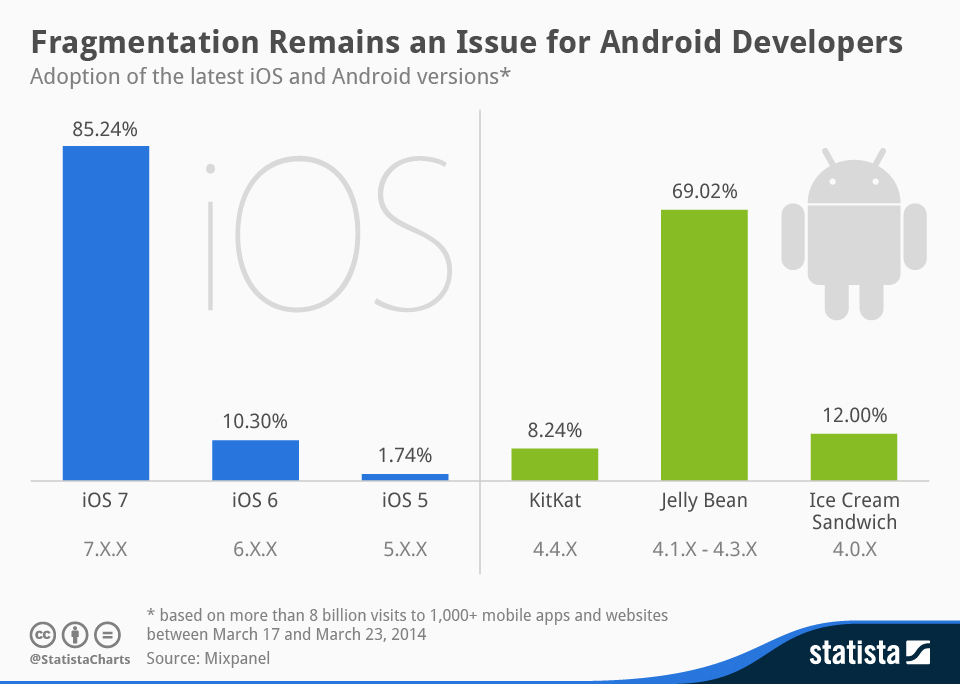
Mobile ecosystems (especially Android) are notoriously fragmented. This fragmentation affects performance, UI consistency, security behavior, and even feature availability.
Testers must account for layers of variation such as:
- Device diversity across iOS and Android: Hundreds of Android manufacturers and numerous Apple device generations create massive variability in screen sizes, hardware performance, and configuration possibilities.
- OS version fragmentation: Many users delay updating their devices, meaning apps must work across multiple OS versions with different APIs, permission models, and system behaviors.
- Hardware differences: Features like GPS modules, sensors, camera systems, processors, graphics chips, and biometric tools (Face ID, fingerprint scanners) behave differently across devices.
Because of this, mobile testing requires tools that support real-device coverage that address fragmentation by providing access to physical devices and high-fidelity simulations.
Web Fragmentation
Although web apps don’t need to account for physical hardware differences, they still contend with a different form of fragmentation. The browser landscape continues to evolve, and inconsistencies between engines can dramatically affect how an application behaves.
Key sources of fragmentation include:
- Browser version differences: Users may run older Chrome releases, non-Chromium versions of Edge, or outdated Safari builds.
- Rendering engine variations: Chrome and Edge use Blink, Safari uses WebKit, and Firefox uses Gecko, each with its own quirks.
- Desktop vs responsive mobile layouts: A web app might render flawlessly on a laptop but behave unpredictably on a small mobile browser viewport.
How Interaction Models Influence Application of Software Testing Tools
Mobile and web applications behave differently because users interact with them in fundamentally distinct ways. These interaction models shape the testing approach and determine which tools can accurately simulate real-world behavior. Mobile apps rely heavily on physical movements, environmental inputs, and device-level events, while web apps operate within the more predictable constraints of browser-based interactions.
Mobile experiences are built around gestures, accelerometer activity, GPS triggers, and push notifications. A mobile tester must validate swipes, long-presses, multi-touch actions, device rotation, background-to-foreground transitions, and features tied to location or movement. Only specialized mobile testing tools (such as Appium, Espresso, and XCUITest) can simulate or capture these complex, sensor-driven interactions reliably. These tools also support testing scenarios where apps respond to notifications, network fluctuations, or permission prompts, all of which influence user flow.
In contrast, web apps depend on more structured inputs: clicks, hover states, scroll behavior, and keyboard entry. Testing tools like Playwright, Cypress, and Selenium are optimized for these browser-native events, offering precise control over DOM interactions and rendering behavior.
Ultimately, the right tool must align with the interaction model of the application. Accurate simulation ensures the final product behaves naturally for users, whether they’re tapping a screen or navigating with a mouse and keyboard.
Network and Performance Realities
Mobile and web applications operate in very different network and performance environments, which mean their testing tools must replicate distinct real-world conditions. Mobile apps depend heavily on variable connectivity and device behavior, requiring testers to simulate 3G, LTE, 5G, Wi-Fi drops, and full offline modes. They also need to validate how an app handles backgrounding, foregrounding, and bandwidth throttling, all of which can interrupt active processes or trigger unexpected state changes. Mobile performance tools such as Firebase Test Lab and Appium-based network conditioning allow teams to recreate these scenarios across multiple devices and OS versions.
Web applications, on the other hand, operate inside controlled browser environments. While they must still account for slow networks or large asset loads, testing is more reliant on browser-native throttling tools found in Chrome DevTools, Firefox Developer Tools, and automated solutions like Lighthouse. These tools focus on measuring render speed, code efficiency, and asset delivery pipelines.
The divergence comes down to context: mobile tools must simulate dynamic, device-specific conditions, while web tools focus on page load, rendering, and network optimization within the browser.
Security and Compliance Differences
Security expectations differ sharply between mobile and web applications, which is why teams must choose testing tools designed for each environment’s unique threat surface. Mobile apps operate within tightly controlled OS ecosystems, while web apps run inside open browser environments exposed to cross-site vulnerabilities. These differences shape how organizations design their security test plans and select the right tooling.
Mobile Security Testing Priorities
Mobile applications store sensitive data locally, interact with device hardware, and operate inside OS-level sandboxes. Security testing must therefore validate:
- Permissions: ensuring the app does not request or misuse access to sensors, contacts, location, or background services.
- Sandboxing behavior: confirming the app cannot break isolation or access data from other apps.
- Secure storage: reviewing use of Keychain (iOS), Keystore (Android), and encrypted local storage.
- App integrity: detecting tampering, debugging, jailbreak/root exposure, and insecure build configurations.
Tools like Mobile Security Framework (MobSF) and Android/iOS security scanners help automate these checks while supporting manual security reviews.
Web Security Testing Priorities
Web applications depend heavily on browser trust models and HTTP interactions, creating an entirely different security profile. Testing must examine the following.
- Browser-based vulnerabilities such as XSS and clickjacking.
- CORS configuration to prevent unauthorized cross-origin access.
- Cookie handling and session control including SameSite policies, CSRF tokens, and HTTPS enforcement.
- Server–client communication security, such as TLS configuration, API authentication, and exposed endpoints.
Popular tools like OWASP ZAP, Burp Suite, and automated CI-based scanners help identify issues early in the release cycle.
Why Specialized Tools Matter
Because mobile and web apps face different attack vectors, a single testing platform rarely covers both well. Mobile environments require deep insight into OS-level behavior, while web environments demand strong analysis of browser, server, and network interactions. Selecting tools tailored to each technology ensures stronger compliance, more reliable protection, and fewer post-release vulnerabilities.
Tool Ecosystem Comparison
The ecosystem of mobile and web testing tools has evolved in direct response to the architectural, performance, and interaction differences between platforms. These tools aren’t interchangeable because the problems they solve are fundamentally different.
Below is a high-level comparison showing why each category of tools exists.
Mobile-Focused Tools
Mobile applications depend on access to physical hardware, system-level permissions, and native frameworks. As a result, mobile-focused tools emerged to solve problems web tools simply cannot reach.
- Appium: enables cross-platform testing for both iOS and Android without rewriting test scripts for each OS. It was built to address the challenge of maintaining consistent tests across diverse mobile environments.
- Espresso: gives Android teams direct access to the UI thread and system-level behaviors. Google developed it because generic tools couldn’t reliably interact with Android’s rendering pipeline.
- XCUITest: provides iOS developers with secure, OS-native automation. Apple designed it to work within iOS’s sandboxed environment and ensures high-trust, reliable testing.
- Kobiton: provides scalable access to real devices for testing across hardware and OS variations. It was created to solve the logistical challenge of maintaining large device labs.
- BrowserStack App Live: allows teams to perform manual and automated tests on real devices in the cloud. It addresses the need for distributed QA teams to validate apps across multiple device types without investing in physical infrastructure.
Web-Focused Tools
Web applications run inside the browser, which means they inherit a separate set of challenges: rendering engines, JavaScript timing, DOM changes, and network-dependent behaviors. Web testing tools were created to solve problems specific to browser execution, not device hardware.
- Cypress: designed for modern JavaScript-heavy applications where traditional automation struggled. It provides reliable testing of asynchronous UI behavior.
- Playwright: enables automation across multiple browsers, including Chromium, WebKit, and Firefox. It was developed to overcome inconsistencies in browser rendering and timing issues.
- Selenium: serves as a universal web automation framework. Its standardization across browsers allows teams to test any browser environment effectively.
- BrowserStack Web Testing: provides cloud access to combinations of browsers, OS, and versions, reducing setup overhead and simplifying cross-browser testing.
- LambdaTest: supports parallel testing in scalable environments. It was built to shorten release cycles by allowing QA teams to validate applications across multiple browsers and platforms simultaneously.
Choosing the Right Tool Based on Project Type and Risks
Selecting the right testing tool requires a clear understanding of your application’s architecture, risk profile, fragmentation challenges, and budget constraints. The goal is not to use every tool available, but to ensure the chosen tools address the specific risks and requirements of your project.
- Native applications, tools like Appium, Espresso, and XCUITest are best suited because they provide deep access to OS layers and device-specific features.
- Hybrid applications, which combine embedded web components with native shells, often benefit from a combination of mobile-focused and web-focused tools, ensuring both the underlying browser layer and native device interactions are validated.
- Web applications rely primarily on browser behavior, so tools such as Cypress, Playwright, and Selenium provide the control needed to test across multiple browsers and rendering engines.
Risk profile also informs tool choice. High-risk features (like payment processing, location services, or sensitive user data) require robust, real-device testing to catch edge-case issues. Low-risk features, such as static content display, may be adequately validated with simulated environments or browser-based testing.
Device and browser fragmentation is another critical consideration. Mobile fragmentation across iOS and Android devices, multiple OS versions, and hardware variations necessitates testing on real devices or device farms. Web applications, on the other hand, require cross-browser testing tools to ensure consistent rendering and functionality across different browsers and screen resolutions.
Budget constraints often influence whether teams rely on physical devices or simulators/emulators. Real devices provide higher accuracy but come at a greater cost, while simulators and cloud-based solutions can reduce expenses while still providing meaningful test coverage.
Choosing the right combination of tools ensures efficiency, risk mitigation, and quality outcomes. For guidance on selecting the ideal software testing tools for your next project, contact AppIt today to develop a testing strategy tailored to your business goals.