When a customer logs into an online portal, checks an order, or books an appointment, several technologies work together to make it happen. The interface they see is only one part of the application. Behind the scenes, other technologies process their requests, retrieve information, and keep everything running.
Understanding how these technologies work together is useful when planning a custom web application. You don't need to know how to code, but knowing what different web development languages do can help you make informed decisions about your project.
In this guide, we'll break down the technologies involved and explain how they contribute to a functioning web app.
What Is a Web App, and How Does It Work?
A web application is software that users access through an Internet browser rather than installing it directly on their devices. Unlike a traditional website that primarily presents information, a web app allows users to interact with data, complete tasks, and access personalized functionality.
Common examples include customer portals, online booking systems, project management platforms, and software-as-a-service (SaaS) products.
For example, a customer portal might allow users to log in, view their account information, track orders, and update their details. Each action involves different parts of the application working together to deliver the information or functionality requested.
Although web apps and traditional websites share many underlying technologies, web applications typically require more complex functionality behind the scenes.
Understanding the Three Layers of a Web Application
Most web applications can be understood in terms of three main layers, each responsible for a different part of the user experience.
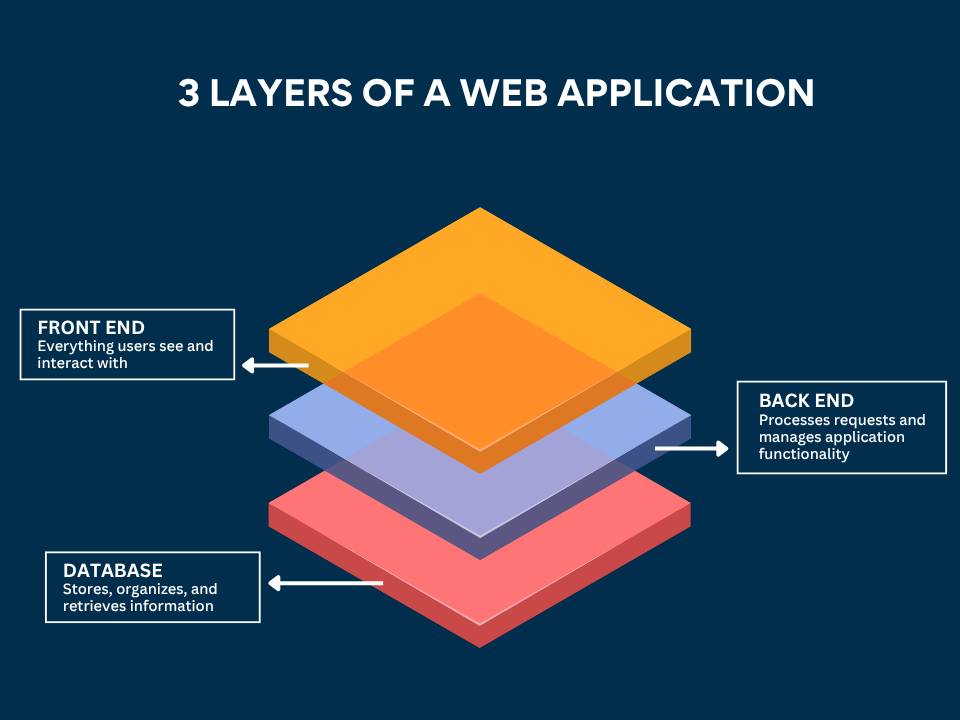
- Front end: Everything users see and interact with in their browsers, including buttons, forms, menus, and dashboards.
- Back end: The server-side functionality that processes requests, manages business rules, checks permissions, and communicates with other systems.
- Database: The system responsible for storing, organizing, and retrieving information such as customer records, account details, and transaction histories.
These layers communicate to make the application work.
Imagine a customer logging into their account and selecting ‘View My Orders’. The front end sends the request to the back end, which checks the information the customer is allowed to access, and retrieves the relevant records from the database. The results are then sent back to the browser for the customer to view.
Front-End Languages: Building What Users See
The front end is the part of your web application that customers and employees interact with directly. It determines how information is presented, how users navigate the application, and how the interface responds to their actions.
Building the front end involves several different languages and technologies, each serving a specific purpose. While these terms are often used interchangeably, not all web development languages are technically programming languages. Three core technologies form the foundation of most modern web interfaces: HTML, CSS, and JavaScript.
HTML5: The Structure
HTML (HyperText Markup Language) defines the structure and content of a web page. It tells the browser which elements should appear, such as headings, paragraphs, images, forms, and buttons.
For example, in a customer portal, HTML provides the structure for the account dashboard, including the sections displaying customer details and order information.
CSS: The Design and Layout
CSS (Cascading Style Sheets) controls how HTML elements appear on the screen. It determines aspects such as colors, fonts, spacing, positioning, and responsive layouts.
CSS also helps interfaces adapt to different screen sizes, allowing customers to use the same web application across various devices, such as on a desktop computer, tablet, or smartphone.
JavaScript and TypeScript: The Interactivity
JavaScript makes web applications interactive. It allows interfaces to respond to user actions, update information, validate forms, and display new content without requiring a complete page reload.
For example, JavaScript can update an order status on a dashboard or display an error message when a user enters incorrect information.
TypeScript builds on JavaScript by adding features that help developers identify certain coding errors earlier and manage larger, more complex applications.
JavaScript Frameworks and Libraries: React, Vue, and Angular
While HTML, CSS, and JavaScript provide the foundations of a web interface, building a complex application entirely from scratch can be time-consuming.
JavaScript frameworks and libraries provide reusable components, development tools, and established approaches that help teams build and maintain applications more efficiently.
Three widely used options are Vue.js, React, and Angular.
React vs Vue vs Angular: Which Should You Choose?
There isn't one framework that's automatically better for every project. Each offers advantages depending on the application's complexity, your existing systems, and the development team's experience.
- Vue.js can be an attractive choice for businesses looking for flexibility and a relatively straightforward development approach.
- React offers an extensive ecosystem of supporting tools and libraries, making it suitable for a wide range of applications.
- Angular provides a more structured framework that can be particularly useful for larger teams working on complex business systems.
When comparing React to Angular, or React to Vue, it's worth looking beyond popularity. Consider how easily the application can be maintained, whether developers with the necessary expertise are available, and how well the technology supports your long-term plans.
Ultimately, the best choice is the one that meets your application's requirements and the team responsible for building and maintaining it.
Back-End Languages: Processing Requests Behind the Scenes
While the front end handles what users see and interact with, the back end manages the processes that make those interactions possible.
For example, when a customer logs into a portal, the back end verifies their credentials, determines what information they're allowed to access, and handles requests for their account details. It also manages business rules, such as calculating discounts, updating order statuses, or checking whether a product is available.
Developers use different back-end programming languages, often alongside frameworks or runtime environments that provide tools for building these systems.
Some common options include:
Node.js vs Python: What's the Difference?
Node.js and Python are both popular options for back-end development, although they approach certain tasks differently.
Node.js is a JavaScript runtime commonly used to build APIs and applications that handle many simultaneous network requests. Python, often paired with frameworks such as Django, is valued for its readable syntax and broad ecosystem, including tools for data processing and machine learning.
Neither is inherently better for every application. Performance, existing integrations, developer expertise, and the type of work the server needs to perform should all influence the decision.
Databases: Where Your Web App Stores Information
Most web applications need somewhere to store information, so it remains available between visits.
In a customer portal, this might include account details, order histories, payment records, and user preferences. The database organizes this information so the application can retrieve or update it when needed.
Two common approaches are relational databases and document databases.
- Relational databases, such as MySQL and PostgreSQL, organize information into tables that can be connected through defined relationships. They use SQL (Structured Query Language) to manage and retrieve data. This approach is particularly useful when an application needs to maintain clear relationships between records, such as customers, orders, and payments.
- Document databases, such as MongoDB, store information in flexible, document-like structures. This can be useful when an application works with records that have varying fields or changing data requirements.
Neither approach is universally better. The right database depends on how your information is structured, how different records relate to one another, and how the application needs to access and update that data.
How These Technologies Work Together: A Customer Portal Example
Now that we've explored the individual technologies, let's look at how they might work together in a functioning web application.
Imagine your business has a customer portal that allows users to log in, manage their accounts, and track orders.
For this example, we'll use a hypothetical technology stack consisting of Vue.js for the front end, Node.js for the back end, PostgreSQL for the database, and Amazon Web Services (AWS) for hosting.
Here's what happens when a customer clicks the ‘View My Orders’ button:
- The customer makes a request. They click the button in the Vue.js interface, which sends a request to the application's back end through an API (Application Programming Interface).
- The back end processes the request. The Node.js server checks the customer's authorization and determines which order records they can access.
- The database retrieves the information. The server queries PostgreSQL, which returns the relevant order details.
- The back end prepares a response. The server organizes the retrieved information and sends it back to the front end.
- The customer sees their orders. Vue.js updates the dashboard to display the results without requiring the entire page to reload.
This process typically happens quickly enough that the customer experiences it as a single action.
Of course, a complete web application may involve additional services. For example, a payment provider such as Stripe could handle transactions, while an email service could send order confirmations. These services can connect to the application through APIs.
AWS, meanwhile, could provide the infrastructure needed to host and run the application.
The important takeaway is that each technology has a specific responsibility, but they must work together to deliver a reliable user experience. The exact languages, frameworks, and services may differ from one project to another, depending on the application's requirements.
Single-Page vs Multi-Page Web Apps
Beyond choosing programming languages and frameworks, developers also need to consider how a web application delivers content to users.
Two common approaches are single-page applications (SPAs) and multi-page applications (MPAs).
- Single-page applications load an initial page, and then use JavaScript to update content as users interact with the application. This can create a smooth experience for features such as dashboards, customer portals, and other highly interactive interfaces.
- Multi-page applications typically load a new HTML document when users navigate between pages. This approach is common for content-heavy websites and applications with many distinct pages.
What Does Your Web App's Technology Stack Mean for Your Business?
Choosing web app development languages isn't simply a technical decision. The technologies used to build your application can influence development costs, maintenance requirements, and how easily the platform can evolve as your business grows.
When evaluating a proposed technology stack, there are several practical considerations worth discussing with your development partner:
- Development time and cost: Established frameworks, reusable components, and existing integrations can reduce the amount of custom development required. However, project complexity and functionality will still have a significant impact on costs.
- Hiring and long-term maintenance: Choosing technologies with an established developer community can make it easier to find qualified professionals to maintain, update, or take over the application in the future.
- Performance: Programming languages matter, but performance also depends on factors such as application architecture, database design, hosting infrastructure, and how efficiently the software is developed.
- Future scalability: Your application may eventually need new features, additional integrations, or support for more users. A well-planned architecture can make these changes easier to accommodate.
It's also worth considering how the application will be maintained after launch. Development practices such as continuous integration and continuous delivery (CI/CD) can help teams test, deploy, and manage updates more consistently.
The goal isn't necessarily to choose the newest or most popular technology. It's to build an application that meets your current needs without creating unnecessary complications as your business evolves.
Build the Right Web Application with AppIt
Understanding how web development languages work together is an important first step, but choosing the right technologies for your project requires more than comparing programming languages and frameworks.
At AppIt, we help businesses turn their ideas into custom applications built around their specific requirements. From selecting suitable front-end and back-end technologies to planning integrations and long-term scalability, our team considers how each technical decision supports the finished product.
Whether you're developing a new customer portal, modernizing an existing platform, or building a complex business application, we're here to help.
Contact us at AppIt to discuss your web application development project.