


For years, the conversation around AI in software development has largely centered on one question: how much code can AI write?
Android development is starting to point towards a more useful question: how effectively can AI work within the development process itself?
Google’s latest Android developer tools suggest that the answer is increasingly tied to specialized AI agents that can understand Android-specific tasks, use development tools, and evaluate their own work.
Three additions are particularly important:
- Android CLI, a command-line interface that gives coding agents access to Android development workflows;
- Android Skills, an open-source collection of specialized guidance for common Android tasks; and
- Android Bench, a benchmark for evaluating how well AI agents perform on real Android development challenges.
Together, these tools move AI agent development beyond simply generating snippets of Kotlin (Android’s programming language). An agent can increasingly build, run, inspect, and refine an Android project with the right tools and instructions available to it.
That does not make the developer irrelevant. If anything, it makes experienced oversight more important. AI can take on repetitive work and support AI pair programming, but people still need to make the architectural, product, and user experience decisions that determine whether an app is worth using.
Why Generic AI Struggles with Android Development
Building an Android app is rarely as simple as writing the code for a feature and calling it done. The platform is constantly evolving, with new Android SDK requirements, updates to Jetpack libraries, and changing recommendations for how apps should be built and tested.
At the same time, developers must account for the wide range of devices people use, from phones and tablets, to foldables and larger screens. An interface that works well on one device may need to behave very differently on another.
This is where a general-purpose AI model can run into limitations. It may know Kotlin and be able to generate Jetpack Compose code, but that does not necessarily mean it knows the right approach for a particular Android project. It may not understand the best migration path from traditional XML layouts to Compose, recognize the latest recommended APIs, or know how an app should be tested across different configurations.
The result can be code that works in isolation but creates problems further down the line. Google’s new tools address this gap by giving AI agents more specialized Android knowledge and access to the workflows they need to work effectively.
Android CLI: Giving AI Agents Direct Access to Android Workflows
One of the biggest limitations of asking an AI agent to build an app is that writing code is only one part of the job. The agent also needs a way to interact with the Android environment, check what it has built, and make changes based on what it finds. That is where Android CLI comes in.
Android CLI is a command-line tool designed to give coding agents access to core Android development workflows. Rather than generating code and stopping there, an agent can use the CLI to:
- create Android projects from templates
- install, update, and manage Android SDK components
- build, deploy, and run apps on devices or emulators
- create and manage Android Virtual Devices
- capture screenshots and inspect UI layouts
- search the official Android documentation
- discover and install Android Skills.
This distinction is important, because it allows the coding agent to interact with the environment in which its code is supposed to work. For example, instead of simply asking an AI to “write a login screen”, an agent could work through a more complete development cycle:
- Create the Android project.
- Build the login interface.
- Launch it on an emulator.
- Inspect the UI layout and capture the screen.
- Run the relevant tests.
- Identify and fix problems.
- Run the workflow again to verify the changes.
This creates a feedback loop between the agent and the application itself. The AI can build, test, inspect, and iterate rather than relying entirely on its initial assumptions.
For developers, this changes the role AI can play in day-to-day work. It starts to look less like asking a chatbot for a block of code and more like AI pair programming, where a coding agent can carry out parts of a workflow while a developer guides the work and reviews the results.
The CLI also gives the agent a direct route to current Android documentation and specialized Android Skills, which can provide additional context for Android-specific tasks. In practice, that makes Android developer tools part of the AI workflow itself, rather than something a developer has to operate separately.
Android Skills: Teaching AI Android Best Practices
If Android CLI gives an AI agent the tools to work with an Android project, Android Skills provide the specialized knowledge to use those tools effectively.
Google describes Android Skills as AI-optimized instructions that help agents understand and execute specific Android development workflows according to current best practices and guidance. They are essentially reusable, task-specific playbooks that an agent can draw on when a particular type of work is needed.
The skills cover a growing range of Android development tasks, including:
- migrating existing XML interfaces to Jetpack Compose
- making apps adaptive across different screen sizes and form factors
- modernizing interfaces for edge-to-edge layouts
- upgrading to Android Gradle Plugin (AGP) 9
- migrating legacy camera implementations to CameraX
- setting up Android testing strategies
- analyzing performance and R8 configurations
- working with Jetpack Compose Styles.
Think of a general-purpose AI model as a smart graduate developer. It may understand programming concepts and know a great deal about Android, but it still needs project-specific context and established processes to consistently handle specialized work. Android Skills are closer to the playbooks that an experienced Android team might give that developer before handing over a complex task.
This is important because a general AI’s default knowledge can become outdated or lack the detail needed for a particular workflow. On the other hand, a Skill can provide more recent Android-specific context and a repeatable sequence of steps, helping an agent approach the same type of task more consistently.
Google’s XML-to-Compose migration Skill, for example, provides a structured process that includes analyzing the existing layout, setting up Compose, migrating the UI, validating the result, and testing the new composable.
The result is not simply an AI that can generate more code. It is an AI agent development workflow with better context for the job at hand. And because Android Skills follow the open Agent Skills standard, they are designed to work with any compatible AI tool or agent, rather than being limited to Google’s own tools. The Android Skills repository is also open source under the Apache 2.0 license.
This does not remove the need for developer judgment. A Skill can guide an agent through a migration or optimization, but an experienced developer still needs to determine whether that change makes sense for the application in the first place.
Android Bench: Measuring Whether AI Is Actually Useful
Giving an AI agent access to Android tools and specialized knowledge is one thing. Knowing whether those additions actually make it better at Android development is another. That is where Android Bench comes in.
Android Bench is a benchmark designed to evaluate AI agents on real Android development tasks. Rather than judging an agent based on how convincing its generated code looks or how quickly it completes a simple demo, the benchmark puts it through practical development challenges and measures how well it performs.
The focus is on:
- real coding tasks rather than isolated code-generation prompts
- existing Android projects and development environments
- repeatable evaluations that allow different approaches to be compared
- measuring how effectively an agent completes the task, rather than simply whether it produces code.
Therefore, it is important for anyone evaluating AI development tools to remember that a model might look impressive when generating a small feature in a controlled demonstration, but real development involves understanding an existing codebase, making changes without breaking other functionality, and validating that the result actually works.
Benchmarks such as Android Bench provide a more objective way to assess those capabilities. They can help developers identify where agents perform well, where they struggle, and which tools or approaches improve their results.
For businesses, this also makes conversations about AI adoption more measurable. Instead of asking, “Does this model feel good to use?” teams can start asking, “How reliably does it complete the Android tasks we actually need it to handle?”
Google has also been expanding the scope and complexity of its Android agent evaluations, including tasks that require agents to work for longer periods and complete multiple steps. This matters because useful software development rarely consists of a single prompt and a single answer. The more realistic the evaluation is, the better it can indicate how an AI agent might perform as part of an actual development workflow.
What This Means for Android Teams
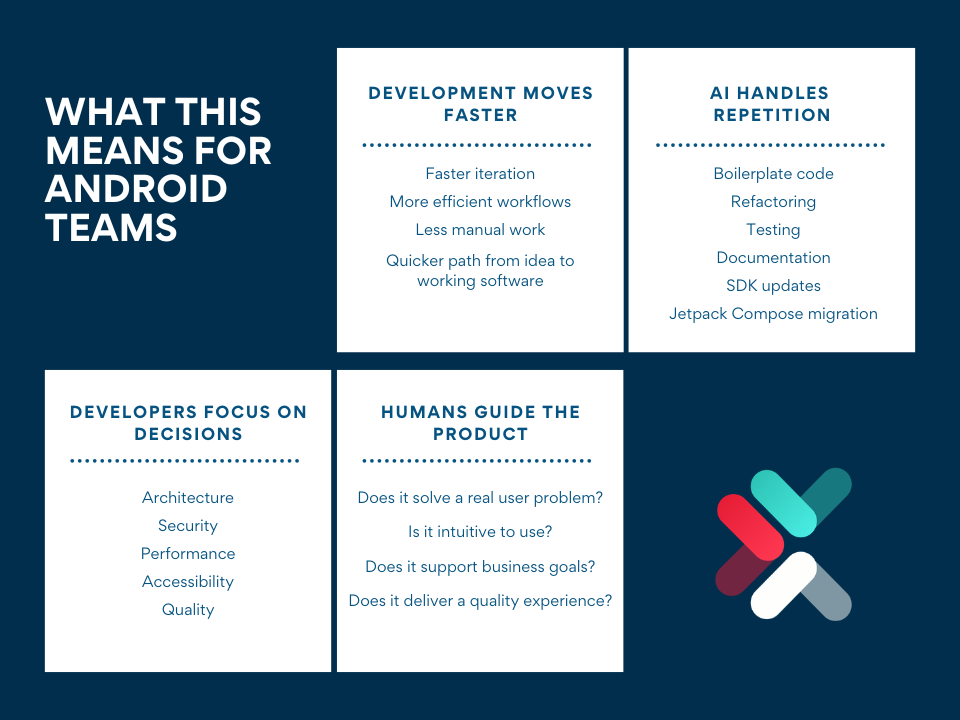
For Android teams, the biggest change is not that AI can suddenly build an entire app without help. It is that more of the repetitive work surrounding development can be handled by an AI agent, giving developers more time to focus on the parts that require experience and judgment.
An agent can assist with boilerplate code, refactoring, testing, documentation, SDK updates, and tasks such as migrating an existing interface to Jetpack Compose. With the right tools and guidance, it can also work through repetitive development cycles without requiring a developer to manually perform every step.
That does not mean every task should be handed over to AI. Decisions about architecture, security, performance, accessibility, and quality still require experienced developers who understand the application as a whole.
The same applies to product decisions. An AI agent can implement a feature, but it cannot determine independently whether that feature solves the right problem for the people using the app, or whether it fits the broader business strategy.
Building an app faster does not automatically make it a better app. A technically impressive application can still frustrate users if its workflows are confusing, its interface is difficult to navigate, or its features do not address a genuine need.
AI can help development teams move from idea to working software more efficiently, but experienced developers remain responsible for guiding that process. The goal should be to use AI where it adds value while keeping people involved in the decisions that shape the product, from its architecture and security to its user experience and business purpose.
The Shift to AI Pair Programming for Android
Android development is moving toward a model where developers are no longer working with AI as a separate assistant that simply generates code on request. Instead, coding agents are becoming part of a broader development environment, with access to specialized tools, Android-specific knowledge, and ways to test and evaluate their work. Android CLI, Android Skills, and Android Bench are good examples of that shift.
The likely future is not autonomous app generation where a developer describes an idea, and an AI produces a finished product without oversight.
It is closer to AI pair programming: developers directing the work while AI helps with implementation, repetitive tasks, testing, and iteration. This can shorten development cycles and give teams more room to focus on the decisions that require human judgment.
For businesses, the important question is therefore not simply whether AI can build an Android app. It is whether the development process produces an app that is secure, reliable, intuitive, and genuinely useful to the people it is intended for.
Better tools can help developers get there more efficiently, but they do not replace the experience needed to make those decisions.
If you are planning a new Android app or looking to improve an existing one, AppIt can help you assess the technical and product considerations involved and turn your requirements into an application designed around your users and business goals.