


Google I/O 2026 made one thing clear: Android is changing, not just through new features, but in how apps are built, experienced, discovered, and maintained.
For businesses with an Android app, that raises more practical questions than simply asking what Google announced.
- What do these changes mean for the way your app should be built?
- And what should you be asking your development partner to make sure you are prepared for what comes next?
The good news is that Google I/O does not mean every company needs to rebuild its app from the ground up. However, it does mean it is worth taking a closer look at your current architecture, development practices, and technology partner.
AI can help development teams work faster, but it does not replace the experience needed to make sound architectural, technical, security, and product decisions. At AppIt, we believe technology should ultimately serve both the business utilizing it, and the people downloading the app.
What Did Google Actually Announce at I/O 2026?
Rather than one single announcement, Google I/O 2026 outlined several changes that point toward a broader shift in how Android apps are designed, developed, and used.
Android is Becoming More Adaptive and Intelligent
Google is moving Android toward an adaptive-first approach, with apps expected to provide good experiences across a wider range of devices and screen sizes. This includes phones and foldables, as well as tablets, laptops, cars, connected displays, and XR devices.
Google also highlighted the growing role of AI and agents in Android, positioning the platform as an increasingly intelligent system that can help users accomplish tasks across apps.
Google’s Development Tools Are Becoming Agent-Assisted
Google is also bringing AI further into the Android development workflow.
Android CLI is now stable and can work with AI agents and development tools, while Google AI Studio can generate native Android applications using Kotlin and Jetpack Compose.
Android Studio is similarly expanding its support for agent-assisted development, making it easier for developers to delegate certain development tasks to AI.
Android Apps Themselves Can Participate in the Agentic Ecosystem
Google introduced AppFunctions, which in future will give developers a way to expose specific capabilities within an app so that authorized agents and assistants can access them. Rather than treating apps as isolated experiences, this creates the potential for apps to become part of broader, agent-driven workflows.
AppFunctions is still experimental, with its Gemini integration currently in private preview, so this is an area to watch, rather than an immediate requirement for most businesses.
What Does This Mean for How Android Apps Are Built?
The announcements at Google I/O are more than new tools and APIs. Together, they point to some meaningful changes in how businesses should approach Android development, from the role of AI in the development process, to the way apps are designed for an increasingly diverse ecosystem.
1. Development Speed is Changing, but Software Engineering is Not Disappearing
AI coding agents are making it possible for developers to move through certain parts of development much faster. Google’s Android CLI, for example, allows agents to perform core Android tasks and access capabilities from Android Studio, while Google AI Studio can generate native Android applications from prompts.
That does not mean a business can simply give an AI a prompt and expect a production-ready application at the end. There is an important difference between using AI to accelerate development and asking AI to take responsibility for the entire development process.
AI can be particularly useful for defined, repetitive tasks such as:
- generating or refactoring code,
- debugging and identifying potential issues,
- creating tests,
- assisting with migrations, and
- handling other time-consuming implementation work.
The resulting code must still operate within a much larger system. Someone needs to make decisions about architecture, security, performance, integrations, business rules, maintainability, testing, and the user experience.
This is an important distinction for businesses evaluating an AI app development company or AI software development agency. Effective AI agent development is not about removing experienced developers from the process. It is about giving those developers better tools with which to work. AI can handle some of the mechanical work, allowing skilled engineers to spend more time on those decisions that require context, judgment, and experience.
At this stage, AI should be seen as a development tool rather than a replacement for a development team. A developer still needs to understand what should be built, why it should be built that way, and whether the finished product actually solves the problem it was intended to solve.
2. “Build Once for Mobile” is Becoming a Weaker Strategy
Google's move toward an adaptive-first Android ecosystem reflects a fundamental change in the devices people use. Android apps increasingly need to work across phones, foldables, tablets, laptops, automotive displays, XR devices, and other connected experiences. Google now cites more than 580 million varied large-screen Android devices, making adaptive design a significant opportunity rather than a niche requirement.
Google is also making Jetpack Compose its standard for Android UI development, with Views moving into maintenance mode. Compose is designed to support adaptive interfaces and gives developers tools for building experiences that can respond to different screen sizes and input methods.
For businesses, this means adaptability should be considered early rather than treated as an add-on. That does not mean every app needs to support every Android form factor from day one. It means the underlying architecture should not make future expansion unnecessarily expensive or difficult.
3. Existing Apps May Need an Assessment, Not an Automatic Rebuild
Google’s new Migration Assistant in Android Studio can help developers port applications from platforms such as iOS, React Native, and web frameworks to native Android. Google says the agentic workflow can reduce work that previously took weeks of manual porting to a process measured in hours.
That is a significant development, but faster migration does not automatically make migration the right decision.
Before moving an existing application to native Android, a development team should consider:
- current performance and reliability,
- the application’s existing architecture,
- accumulated technical debt,
- the current user experience,
- ongoing maintenance costs,
- future product requirements, and
- whether native Android capabilities would provide enough value to justify the investment.
In some cases, modernizing an existing codebase may be the better option. In others, a native Android application could provide advantages that make migration worthwhile. The important thing is that the decision should be driven by the product and business requirements, not simply by the availability of a new AI-powered tool.
4. Apps Need to Think Beyond the Screen
Google is also exploring a different way for users to interact with apps through its Android intelligence system. AppFunctions will allow developers to expose specific app capabilities as functions that authorized agents and assistants can discover and execute on the device.
The potential shift is significant. Instead of a user always opening an app and navigating through several screens to complete a task, an agent could eventually invoke a specific function on the user’s behalf. Imagine a travel app where a user asks an assistant to find their upcoming flight and check them in. Rather than simply opening the airline app and handing control to the user, an authorized agent could potentially access specific functions exposed by the app to retrieve the booking and complete the check-in process.
However, the opportunity is not simply to “add AI” to an application. Teams need to identify which tasks are ones the users actually want to accomplish, whether those tasks are suitable for agentic interactions, and how permissions and confirmation should work. Google itself recommends clear confirmation steps when agents invoke app functions.
AppFunctions is still experimental technology, so companies do not need to redesign their apps around it today. What they should do is start thinking about which capabilities could become useful entry points for future intelligent experiences.
This future shift makes product thinking even more important: the goal is not to make an app more technologically complex, but to make it more useful and intuitive for the people using it.
What About Google AI Studio, Antigravity and Agentic Coding?
Google is making it increasingly possible to move from an idea to working application code with the help of AI. Google AI Studio can generate native Android apps using Kotlin and Jetpack Compose, while Antigravity takes an agent-first approach to development. Android CLI also allows developers to work with different AI agents and development tools through a common command-line interface.
For businesses, however, the important distinction is between building a prototype quickly and delivering a production-ready application. An AI agent can generate code, work through defined tasks, and help developers experiment with ideas far more quickly. AI coding agents can also take on repetitive implementation, testing, debugging, and other time-consuming work, freeing developers to focus on more complex problems.
That does not remove the need for experienced software engineers. Production applications need people who can assess architecture, security, performance, integrations, and business requirements, as well as test whether the application delivers the intended experience. AI-generated code still needs to be reviewed, adapted, and maintained within the wider product.
Therefore, although AI is a powerful tool for helping developers work more efficiently, it is not a substitute for the people responsible for turning an idea into a useful, reliable product. The goal is to use an AI agent where it adds value without losing the human expertise needed to build software that works for real users.
What Should You Be Asking Your Android Development Team?
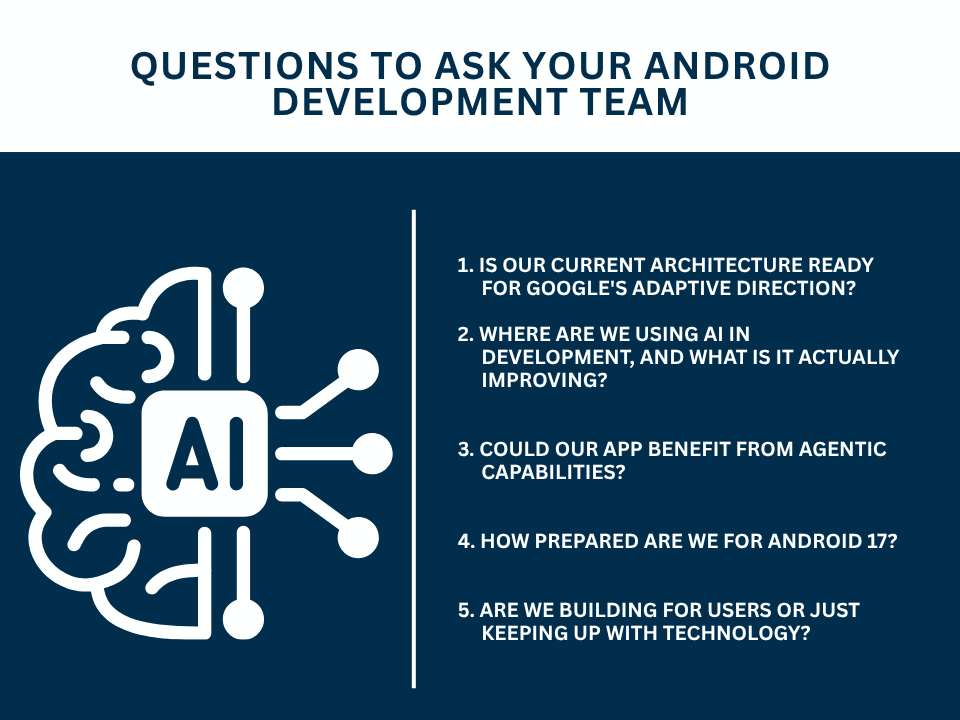
Google I/O 2026 gives businesses plenty to think about, but not every announcement needs to become an immediate development project. The most useful next step is to have a practical conversation with your development team about where your app stands and which changes matter to your product.